Module 03 · myhomeAI
The analyst who has already
read your books.
myhomeAI is a conversation with your own property data. Not a chatbot with opinions about hospitality — an assistant that pulls your occupancy, your channel mix, your guests and your rates before it answers.
- Grounding
- Your live property data
- Languages
- English · Hindi · Bengali
- Response time
- About two seconds
- Allowance
- Visible message counter
Grounded answers
Specific to your property, or it doesn't answer.
Before any question reaches the model, myhomeAI assembles the business context: room count, current occupancy, upcoming bookings, revenue this month, channel performance, guest history. The answer comes back with those numbers inside it.
That is the difference between “consider dynamic pricing for weekends” and “you are at 74% for Saturday with four rooms open, about 5% under the comp set — take the Garden Suite recommendation and hold Courtyard Twin.”
- Suggested questions to open with, free text and voice input for everything else.
- English, Hindi and Bengali — ask in one, get the answer in the same one.
- Answers stream as they are generated instead of arriving as a wall.
- Indian conventions throughout: rupees, IST cut-offs, DD/MM/YYYY dates.
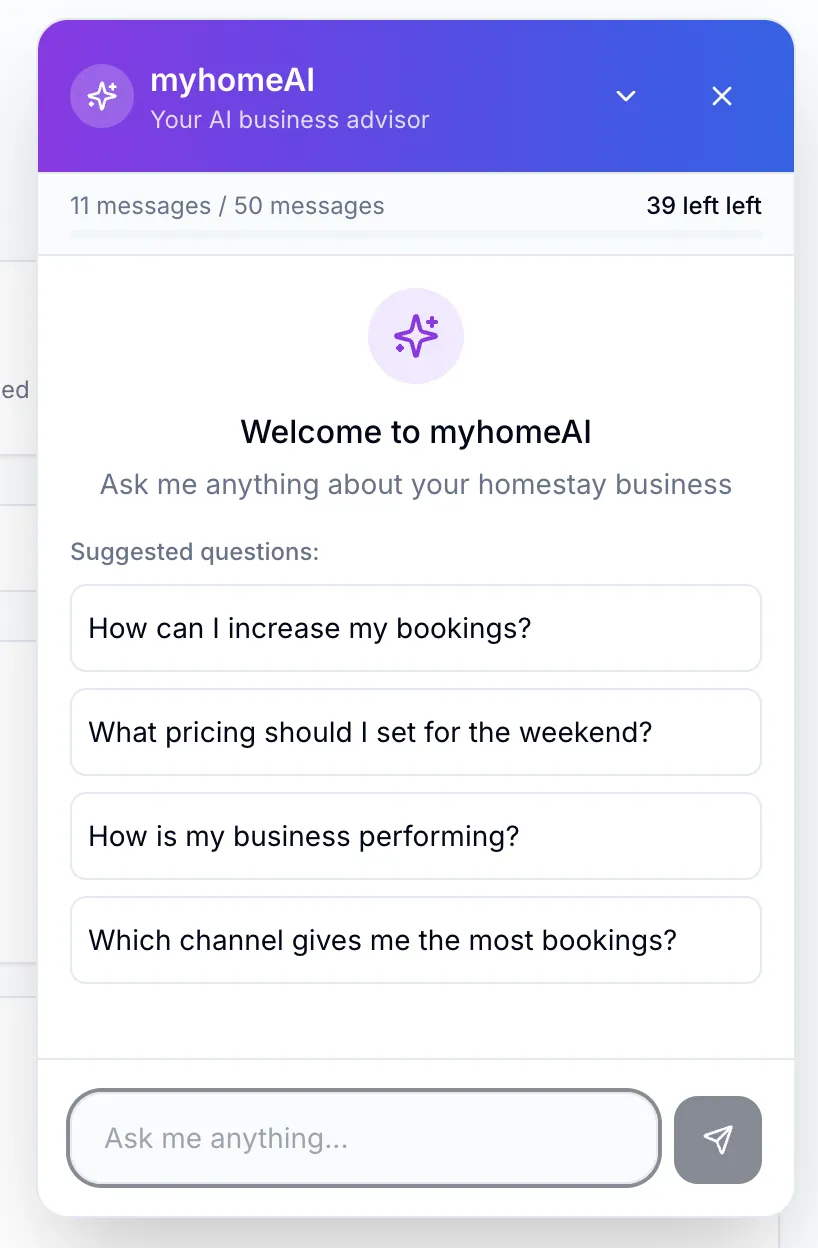
Where people start
The questions owners actually ask.
These ship as one-tap prompts. They are also a fair description of what the assistant is for: the daily operating questions that would otherwise mean opening four reports.
- Revenue analytics
- Total revenue this month · best performing room type · revenue by booking channel
- Occupancy insights
- Occupancy rate this week · weekend against weekday · forecast for next month
- Guest intelligence
- Repeat guest percentage · top spending guests · where your guests come from
- Booking analysis
- Today's check-ins · direct channel bookings · average booking lead time
- Performance metrics
- RevPAR this quarter · ADR comparison · gross operating margin
- Financial questions
- Outstanding payments · collection rate · revenue breakdown
Under the hood
Routed by purpose, capped by budget.
Different jobs go to different models. Conversation, revenue analysis and competitive analysis each route to the model best suited to them, through a single gateway — so a change in provider pricing or availability is a configuration change, not a rewrite.
Spend is metered per account against a daily budget. Owners see plain call counts — “7 of 50 today” — because a rupee figure on an AI usage bar is noise to the person running a homestay.
Streaming responses
Answers begin appearing immediately rather than after the full generation completes.
Conversation memory
Follow-ups keep their context, so 'and last month?' means what it should.
Daily budget per account
A hard cap that resets at midnight IST, with the remaining allowance always visible.
Per-property scope
Multi-property owners choose which property the conversation is about; data never crosses over.
Three-level kill switch
Disable for one property, for the whole feature, or across the platform. The switch stops the calls and the cost, not just the button.
Tenant isolation
Every query is scoped to the owning account. There is no path from one property’s conversation to another’s data.
No prompt leakage
The assistant will not disclose its system prompt or internal instructions, however the request is framed.
Honest about gaps
When the data to answer a question does not exist yet, it says so rather than estimating confidently.
In context
The fastest way into the other four modules.
“Why is this rate recommended?”
myhomeAI explains an aiREV recommendation in context — which signal dominated, what the comp set looked like, and how confident the engine was.
aiREV“Where did last month's margin go?”
It reads the same waterfall Profit Analysis renders, and tells you which channel or which room type moved the number.
Profit AnalysisQuestions
Conversational analytics, explained
- What can I ask myhomeAI?
- Anything about your own business: revenue by room type or channel, occupancy this week against last, repeat guest percentage, today's arrivals, RevPAR this quarter, outstanding payments. It answers from your live property data rather than from general hospitality advice.
- Which languages does it support?
- English, Hindi and Bengali. Ask in one and the answer comes back in the same one, with rupee amounts and Indian date formatting throughout. Voice input is available when typing is impractical.
- Is my property data used to train an AI model?
- No. Your data is assembled as context for answering your own questions, scoped to your account on every query. There is no path from one property's conversation to another property's data.
- Can I turn the AI features off?
- Yes, at three levels — one property, one feature, or platform-wide. The switch is checked before any provider call, so a disabled feature stops the spend rather than just hiding the button.
Ask it something about your property.
In a demo we connect a sample of your booking history and let you ask whatever you would normally have to build a spreadsheet to answer.